Follow an election
On this page
This guide shows how to follow an election with Politics and the news: the Elections page for what is on the ballot, a race's own page, the voting record of the member who holds the seat, the prediction markets on the race, the coverage from many outlets, and a Following page that collects it all.
Politics is on the sites that have it; look for the Politics tab. If it is missing, see Which sites have which services.
#See what is on the ballot
Select Politics, then Elections in the row of Politics sections. The page gives the date of the next general election and how many days are left, then a card for each chamber with its seats now and the market odds on who wins control.
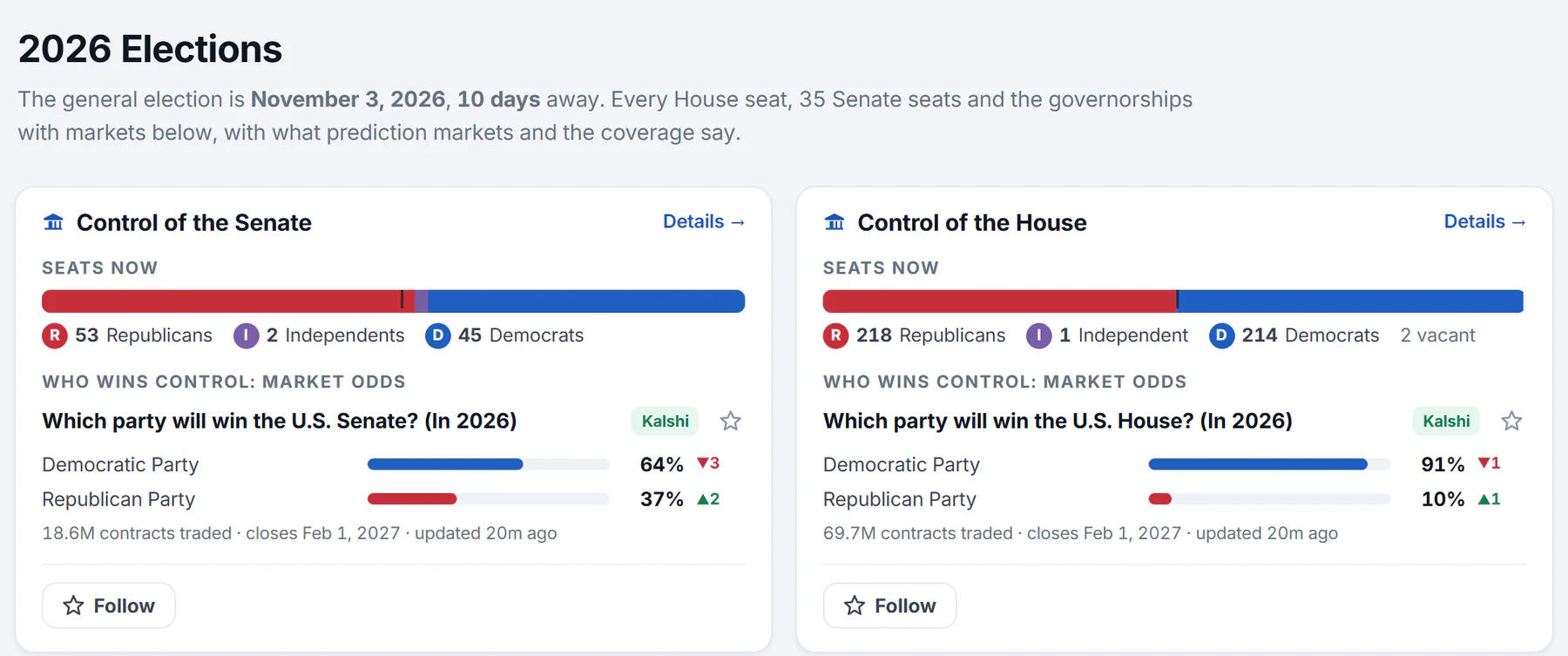
The countdown, then a card for each chamber: seats now and who wins control, by market odds.
- 1Election day and the countdown
- 2Seats now, by party
- 3What a prediction market says about who wins control
- 4Details: the page for this race
- 5Follow this race
Further down are Senate races, one row per seat with who holds it and the market favorite, the Governor races, and House races with the most trading. See The Elections page.
#Open a race
-
Select a state in the Senate or governor table, a district in the House table, or Details on a control card.
-
Read the race page: the election date, The markets' leading names, the open markets with their trend lines, who holds the seat, and headlines from the last two weeks.
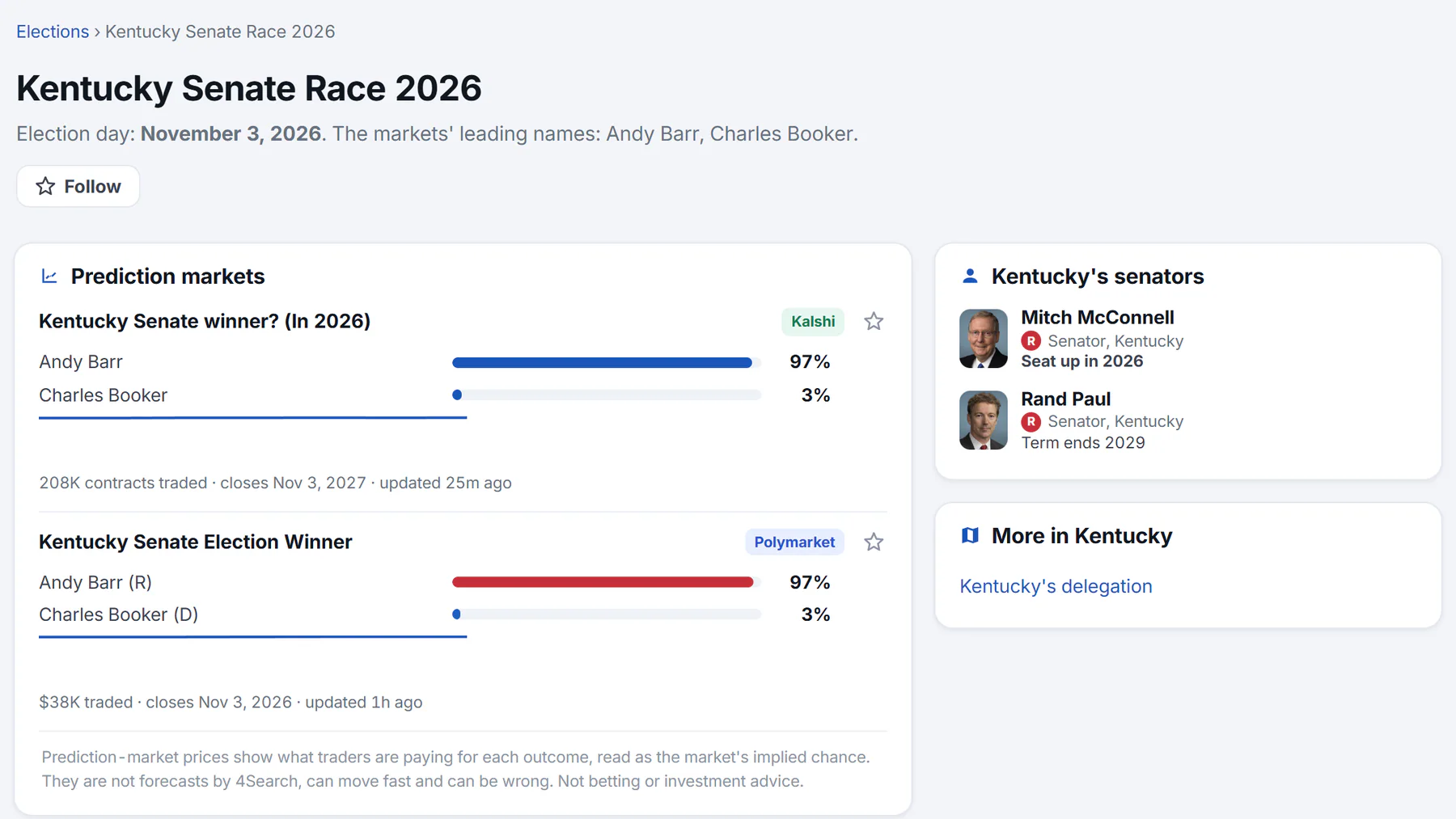
A Senate race: the markets on the left, the seats and the state's other races on the right.
- 1Election day, and the names the markets lead with
- 2Follow the race
- 3A prediction market on the race
- 4Who holds the seat, and which seats are up
- 5Other races and the state's whole delegation
-
Use More in the state to reach its other races and its delegation.
The leading names come from the markets' outcomes, not from the official ballot. For the official list of candidates, use your state's election authority. See A race's page.
#Check the members' records
A race page and the Senate table name the member who holds the seat. Select the name to open their page: their term, a strip of numbers for this Congress (roll calls, missed votes, how often they voted with their party, bills sponsored), and their votes.
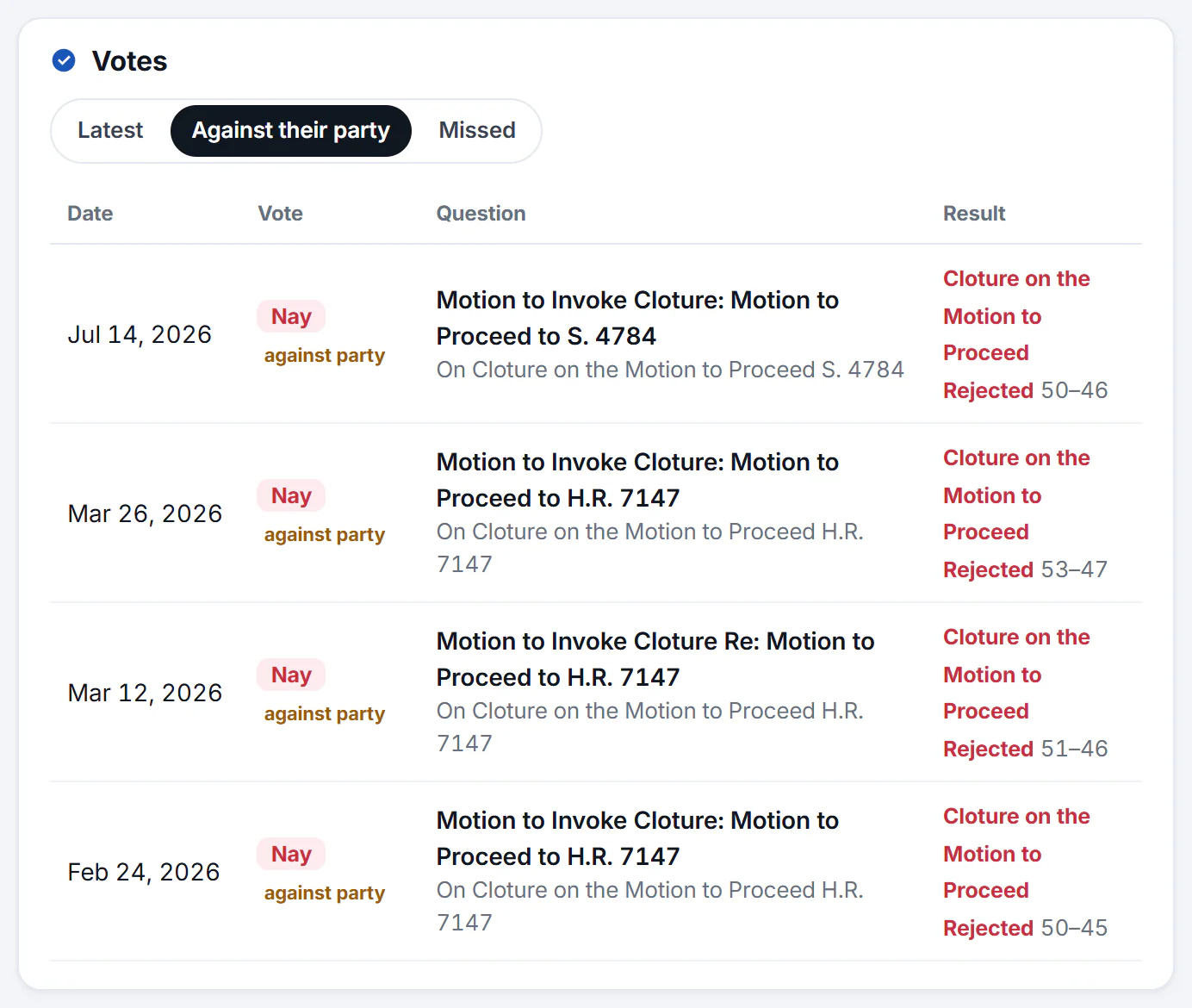
The Votes card switched to Against their party.
- 1Switch between all votes, votes against their party, and missed votes
- 2How the member voted
- 3What the vote was about: select it to open the vote
- 4The result and the tally
The Votes card has three tabs: Latest, Against their party and Missed. Select any vote to see how every member answered. These figures describe the record; they do not say whether someone is doing a good job. See Read a member's page and Read a vote.
#Read the markets with care
Each market card shows its question, its source (Kalshi or Polymarket), each outcome's chance with its change over the last day, and when it was last updated. For every election market in one list, open Prediction Markets and choose Elections.
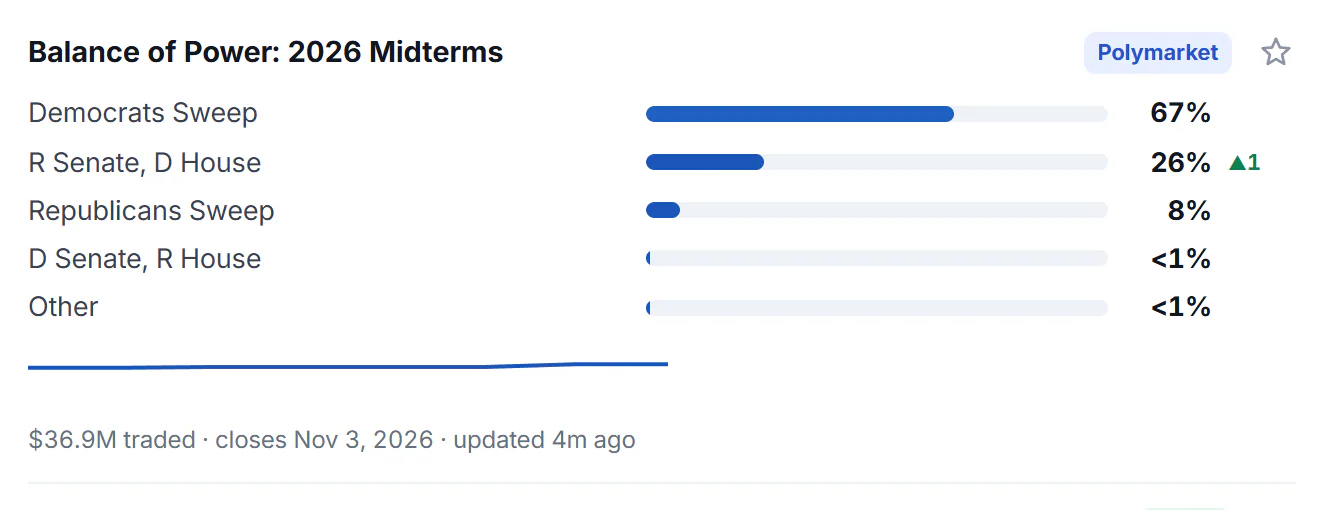
One market card. Its numbers are a snapshot that changes through the day.
- 1The question the market asks
- 2Where the market trades
- 3The chance the market gives the outcome
- 4Change over the last day, in points
- 5The leading outcome over 30 days
- 6Amount traded, closing date, last update
A percentage is what traders are paying, not a poll and not a forecast by 4Search. Two markets on the same race can differ. Predictions, on the sites that have it, shows the same questions across more venues; see Read prediction markets and Prediction markets in Politics.
#Read the coverage
-
Search the News tab for the race or a candidate's full name, with capitals, for example
Chuck Grassley. A card for the member can appear above the results.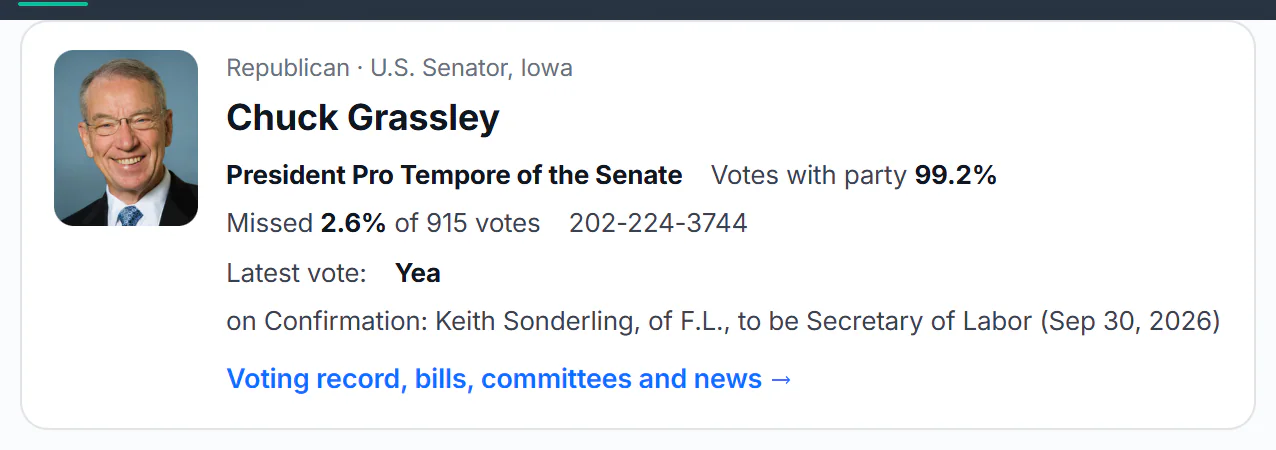
A member's card above the News results: party, office and record at a glance.
- 1Party and office
- 2The record at a glance
- 3Link to the full Politics page
-
On a story about the race, select Full coverage to see other outlets' reports with a similar headline.
-
To keep only recent reporting, set the date menu to 7 days or type
this weekin the search.
See Check how a story is covered for the filters that help compare outlets.
#Follow the race
Select the star beside a race, a member or a market, or Follow on its page. The first time, select Enable cookies and follow to turn on Saved preferences. Then open Following in the row of Politics sections: What's new lists, day by day over the last 14 days, the votes your members cast and the markets that moved 3 points or more in a day, and each race you follow appears with its markets.
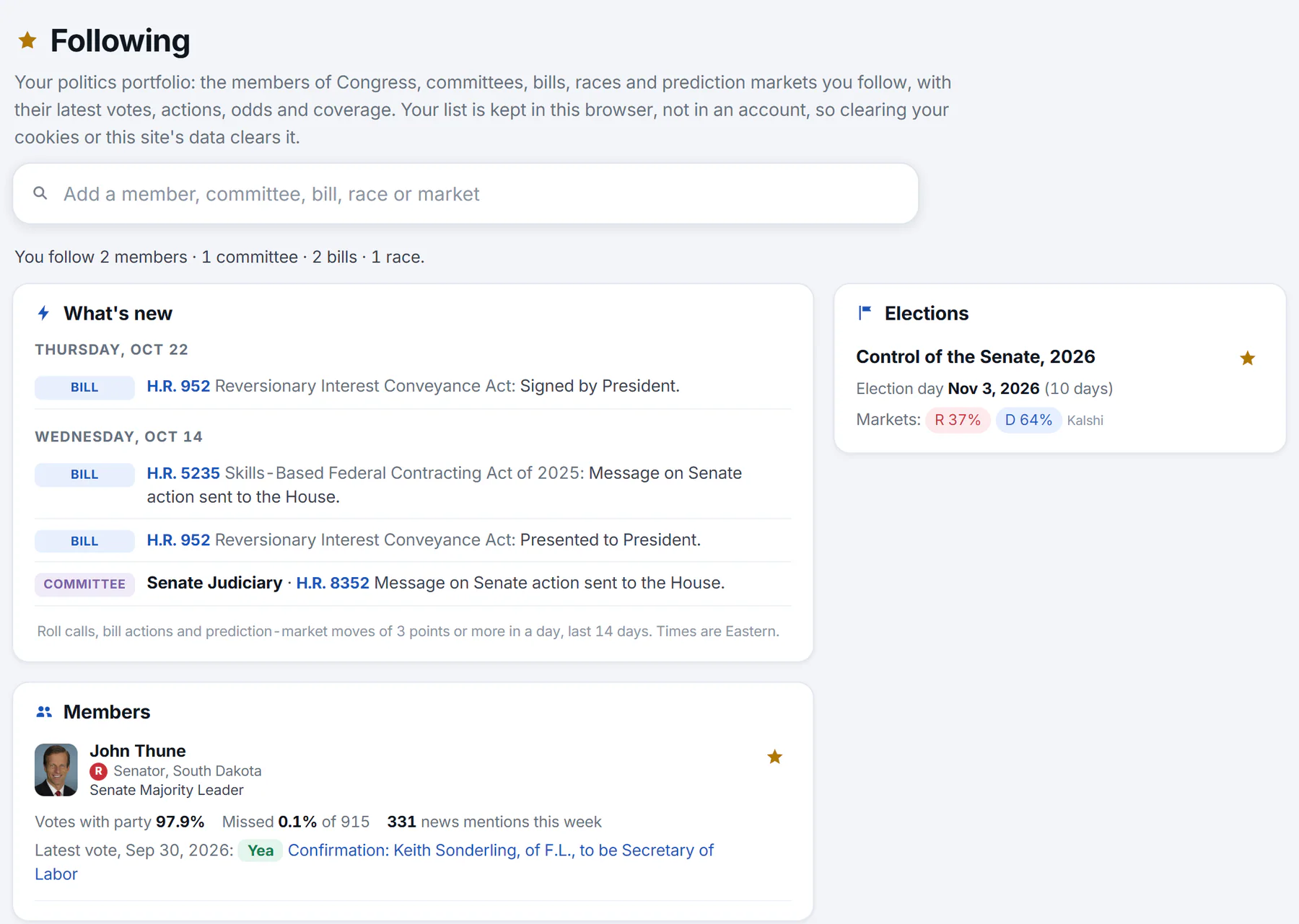
The Following page: what you follow, what is new, and a card for each kind of thing.
- 1What you follow, counted
- 2What's new: votes, bill actions and big market moves from the last 14 days
- 3A card for each kind of thing you follow
- 4Star: stop following
You can follow up to 60 things. See Follow what matters to you.
#Common questions
Does Politics show polls or results?
No. It does not run or publish polls, and it does not report vote counts. The odds come from prediction markets and the headlines from the news index. For results, use your state's election authority and the news.
Does Politics favor a party?
No. It does not endorse any candidate, party or position, and it does not tell you how to vote.
Will I get an alert when a race changes?
No. Politics sends no alerts or emails. Open your Following page to see what changed.